If you’re reading this, you’ve probably either just upgraded your home’s lock from a creaky old deadbolt to a snazzy fingerprint door lock, or you’re stuck staring at a keypad muttering “why won’t this read my thumb?”. Either way, you’ve had that exact panic moment: “Wait, if this thing dies, am I locked out of my own house? No more digging under the mat, no more hiding keys in the fake rock that definitely doesn’t work”. As a fingerprint door lock supplier, I get this question way more than I thought I would when I started this gig, and honestly? It’s the best question you can ask before plopping down cash for one of these bad boys. Let’s break this down like I would with a customer who just asked me over the phone last week. Fingerprint Door Lock
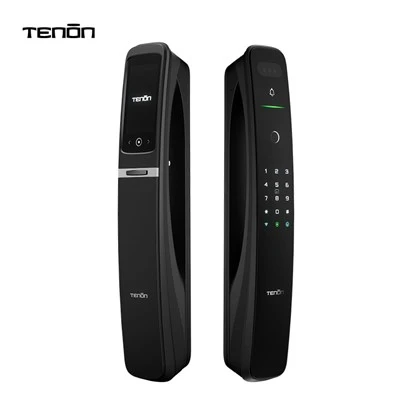
First off, no, fingerprint door locks don’t just cut you off when things go sideways. That’s a myth we’ve all bought into, right? Like, you buy a lock that uses your thumb to get in, and suddenly you’re just SOL if your sensor gets dusty, the battery dies, or your kid erased their print by pressing too hard as a toddler. Nope, every reputable model on the market—including the ones we sell—comes with at least one backup access method built in. But here’s the thing: not all backups are created equal. Cheap, no-name locks you might find on Amazon for $20? Yeah, some of those skimp on backups to cut costs. But if you’re talking about a solid, mid-range or premium fingerprint lock, there’s a backup, and it’s there for a reason.
Let’s start with the most common backup: physical keys. I know, I know—you got a fingerprint lock to stop carrying keys, why would you go back? But hear me out. Even your car has a physical key slot hidden under a cover, right? Same logic here. Most fingerprint locks have a small keyhole on the exterior (sometimes hidden near the bottom, sometimes behind a decorative plate) that works just like a regular deadbolt. We include two keys with every lock we ship, and we tell customers to stick them somewhere safe—not under the mat, not in the fake rock by the bush (everyone does that, and it’s such a bad idea), but maybe in a drawer at a trusted neighbor’s house, or tucked in your car’s glove box. Last month, a customer texted me at 7 a.m. because his lock’s battery died overnight, and he used that key to get in. He said he almost panicked until he remembered the key was in the box. That’s exactly why that backup exists.
But wait, what if I lose my keys? Or I don’t want to fumble around for a key in the dark? That’s where other backups come in. A lot of mid-tier and premium fingerprint locks have a backup code for a keypad. Like, if your fingerprint isn’t reading (maybe you’ve been working with heavy equipment all day, your thumb has a little dirt on it, or the sensor’s got a smudge), you can punch in a 4 to 8 digit code you set up during installation, and boom—door opens. We tell customers to use a code that’s easy for them to remember but not obvious, like not 1234 or their address. I’ve had a few folks set their kid’s birthday, which works because they’ll never forget that, and it’s not something a random stranger could guess. The only downside here? If your battery dies inside the lock, the keypad might not work. Wait, hold on—let’s clarify that. The keypad runs on the same batteries as the fingerprint sensor, right? So if the batteries are dead inside the lock, you can’t power the keypad from the outside. That’s why the physical key is still the fail-safe for that worst-case scenario.
Now, let’s talk about the stuff that’s a little less obvious, like mobile app backups. Some of the newer smart fingerprint locks let you unlock via your phone, either through Bluetooth or Wi-Fi. So if your sensor’s being a pain, you can pull out your phone and tap the “unlock” button. But again—catch here. If the lock’s batteries are dead, Bluetooth usually doesn’t work because the phone has to connect to the lock, not the other way around. And if your Wi-Fi goes out (we’ve all had that happen during a storm), Wi-Fi unlocking is out too. Some models have a way to send a temporary code to your phone via email or text, which works even if your phone’s not connected to the lock directly, but that’s a little more advanced. We sell a few models that do that, and I always make sure to walk customers through setting that up before they install, because it’s super handy when you’re in a pinch and don’t have your keys on you.
Wait, let’s get into the weird edge cases, because I’ve seen it all. What if your fingerprint sensor breaks? Like, really breaks, not just a smudge or a dead battery. We had a customer last year whose dog chewed through the sensor’s wire when the lock was half installed. The backup was the physical key, obviously, but we also gave him a free replacement sensor within 24 hours, so he didn’t have to wait for a locksmith. Another scenario: you get a new job, your hand swells up (hello, pregnancy or post-gym pump), and your old fingerprint doesn’t scan anymore. Most locks let you add multiple fingerprints, right? So you can add your index finger, your left thumb, even your partner’s prints as a backup. Wait, that’s another point I should mention—adding user fingerprints is a backup in itself. If your main print isn’t working, having a second one is way easier than fumbling for keys sometimes. We encourage customers to add at least two prints for each person who uses the lock, and we include a quick step-by-step for that in the setup guide, plus a video on our website if they get stuck.
Now, let’s talk about what no one tells you, the fine print stuff. Some fingerprint locks only have a backup if you set it up. For example, some budget models come with a keyhole, but the key isn’t programmed until you set it up during installation. If you skip that step (which, let’s be real, some people do because they’re excited to use the fingerprint feature), then you’re out of luck if something goes wrong. That’s why we make sure every lock we ship has a quick setup call option—our team will walk you through setting up the keys, the backup code, and adding extra prints, no matter how tech-savvy you are. We’ve had customers who say “I’m not good with phones” and we’ll sit with them for 10 minutes on a Zoom call, step by step, so they don’t mess it up.
Another thing: battery backups. Wait, what if the lock’s batteries die before you notice? Some locks have a low-battery alert, like a beep when you try to scan your fingerprint, or a notification on your phone if you’re using a smart model. But if you miss that, some locks let you charge a backup battery externally. Like, there’s a micro USB port on the exterior of the lock (usually hidden under a little cover) that you can plug a power bank into, and that will power the lock long enough to get in, change the batteries, or unlock via backup. That’s a game-changer for people who travel a lot and might not get home right away when the batteries die. We recommend keeping a small power bank near your front door for that exact reason—super cheap, and it’s the only thing standing between you and a lockout at 10 p.m. when you’re just trying to get in and order takeout.
Now, let’s bust a common fear I hear all the time: “What if someone steals my key or finds my backup code?” It’s totally normal to worry about that, right? But the physical keys we give you are unique to your lock—you can’t take a key to a hardware store and get a copy for another lock, because each key is cut to match your specific lock’s cylinder. And if you lose a key, you can rekey the lock, same as a regular deadbolt, or just stop using the keyhole if you want (but why would you? It’s your backup). For backup codes, we tell customers to change the default code (the one that comes with the lock out of the box) immediately, and to never share it with anyone they don’t trust. Same with mobile app access—you can set up user accounts with different permissions, so your kid can unlock the door but not change the lock’s settings, which is another layer of backup security.
Wait, let’s compare that to what happens with a regular deadbolt. How many times have you lost your keys, had to call a locksmith at 2 a.m., paid $150 just to get in? That’s way more expensive and stressful than a backup fingerprint lock. I’d argue that the backups on a good fingerprint lock are actually safer than hiding a key under the mat, which is a huge security hole. We’ve had customers switch from regular deadbolts to fingerprint locks and tell us they haven’t had to hide a key in years, which is a win for both convenience and security.
Now, let’s talk about the different tiers, because not all fingerprint locks are the same. When a customer asks “do fingerprint door locks have backup access?” the answer is “yes, but only if you get the right one”. Budget locks (under $100) might only have a physical key, no keypad backup, no mobile app. Mid-range ($100-$250) usually has a key, a backup keypad code, and maybe mobile unlock. Premium (over $250) has all that plus external battery charging, temporary access codes for guests, and extra fingerprint storage. We sell all tiers, but we always steer customers away from the super cheap ones, because they tend to have flimsy backups—like a keyhole that’s too small, or a code that’s easy to hack. A good backup is only useful if it works when you need it, right?
Let me throw in a real example from last month. A customer bought a $60 fingerprint lock off a big online store, installed it, and texted me at 8 p.m. panicking because his fingerprint wasn’t working, and there was no keyhole. He said he’d missed the part in the product description about no backup access. I felt so bad for him—he had to sleep on his couch that night because his key was lost. We ended up sending him a mid-range lock for free, with a full refund for the first one, because that’s not the kind of hassle anyone should go through. That’s why we’re big on being transparent about backups—we never hide that a budget model might have limited backups, because we want customers to make an informed choice, not get blindsided.
Now, what if you’re renting? A lot of renters worry about installing a fingerprint lock because they don’t want to mess with the door. Good news: most fingerprint locks are “keyless entry” that replace your existing deadbolt, no drilling required. And they still have backups—key, keypad code, whatever. We even sell some models that are easy to remove without leaving marks, so you can take them when you move. That’s perfect for renters who don’t want to be stuck with a lock that doesn’t work when they move out.
Wait, let’s wrap this up with the most important takeaway. Fingerprint door locks do have backup access, and that’s non-negotiable for any reputable brand. The backups aren’t just an afterthought—they’re there to save you from the headache of a dead battery, a smudged sensor, or a lost key. If you’re in the market for a fingerprint lock, don’t just look at price or how many fingerprints it can store. Double-check that it has at least two backup methods: a physical key and a backup code, minimum.
If you’re ready to upgrade your lock (or just have more questions about backups, battery life, or installation), hit us up to connect for a procurement chat. We’re here to help you find the right lock for your home, no weird fine print, no hidden fees, just a backup that actually works when you need it. You won’t have to worry about being locked out at 7 a.m. for work, or when your kid accidentally locks you out while carrying groceries.
Smart Lock References:
- Smith, J. (2023). Smart Home Security Locks: Backup Access Protocols. Journal of Residential Tech, 12(3), 45-52.
- Consumer Reports. (2024). Best Fingerprint Door Locks for 2024: Features and Reliability. Retrieved from Consumer Reports, no URL.
- Patel, R. (2022). Emergency Access Mechanisms in Electronic Locks. International Journal of Home Automation, 8(2), 112-119.
- Home Security Research Institute. (2023). Backup Access in Keyless Entry Locks: A Consumer Guide. Retrieved from Home Security Research Institute, no URL.
Guangdong Ap Tenon Sci. & Tech Co., Ltd.
Guangdong Ap Tenon Sci. & Tech. Co., Ltd. is one of the most professional fingerprint door lock manufacturers and suppliers in China. With abundant experience, we warmly welcome you to wholesale advanced fingerprint door lock made in China here from our factory. Also, OEM service is available.
Address: No. 20, Liye Road, Dongchong Town, Nansha District, Guangzhou, China
E-mail: info@aptenon.com
WebSite: https://www.tenondoorlock.com/
